


How to Find Sulfur Caves in Minecraft (Chaos Cubed 26.2)
Jun 17, 2026 · 3 min read

How to Find Sulfur Caves in Minecraft
Underground biomes are not always easy to track down, but the Sulfur Caves come with a few telltale hints that, once you know them, save a huge amount of digging and wandering. In our first guide to the Chaos Cubed update, we covered everything the biome contains. Today we answer the next logical question: how do you actually find Sulfur Caves in Minecraft?
If you want to skip the random luck and start exploring right away, the fastest path is to run your own server, pick a known seed, and fly straight to the biome. More on that below.
A Quick Recap: What Are Sulfur Caves?
Added in Minecraft 26.2 Chaos Cubed, Sulfur Caves are an underground biome built mainly from:
- Yellow sulfur blocks
- Red cinnabar blocks
- Water pools that visibly emit gas and bursts of steam
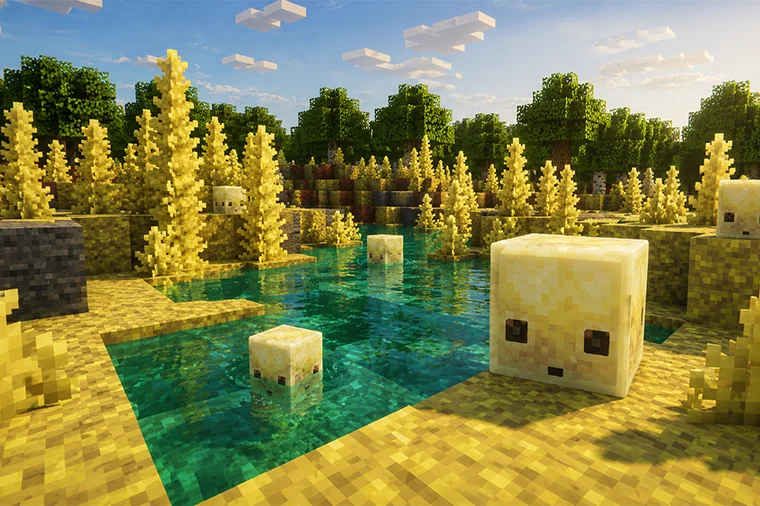
The biome is also the only place to find the exclusive Sulfur Cube mob. Feed a Sulfur Cube a block and, depending on the type, it gains different ball-like physics that are perfect for player-made minigames.
There is also a very rare chance for Sulfur Caves to generate partially on the surface. In those cases, the biome is relatively flat and packed with gassy pools and erupting geysers.
How Sulfur Caves Generate
Sulfur Caves are primarily an underground biome that can generate beneath most terrain, with two main exceptions: oceans and high mountains.
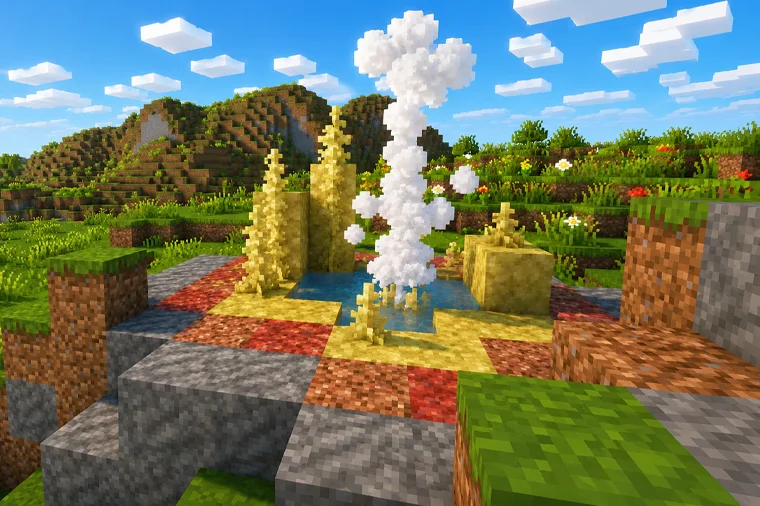
When the biome generates below ground, it is almost always marked on the surface by a Sulfur Spring: a single pool with a geyser, ringed by sulfur, cinnabar, and stone blocks. This is the most important rule to remember:
- A Sulfur Spring never generates without a Sulfur Caves biome directly beneath it.
So the spring is essentially a free signpost telling you exactly where to start digging down.
How to Find Sulfur Caves Without Commands
Following Sulfur Springs on the Surface
Even though the biome is mostly underground, the most efficient way to find it is to travel quickly across the Overworld surface and look for Sulfur Springs. Spot a spring, dig straight down beneath it, and you will arrive in a Sulfur Caves biome.
A quick scouting run with an Elytra usually turns up one spring, often several. Cover ground fast, scan the terrain, and let the springs do the navigating for you.
The Rare Surface Sulfur Caves
Finding a surface Sulfur Caves is far harder. This generation type occurs only very rarely, and even when it can appear, the biome has to be connected to the surface through ravines and caves.
A few things to know about surface generation:
- It only happens where the hidden weirdness value is below -1.0
- A common nearby indicator is a mangrove swamp, which is itself fairly rare
- It exists because of a quirk Mojang chose to leave in the game at the request of fans
Because of this unintended origin, very few players will ever stumble onto a surface Sulfur Cave naturally. If you are determined to find one the hard way, prepare for a long, extensive expedition.
 How to Find Sulfur Caves With Commands
Using /locate
If you would rather skip the search entirely, the /locate command gives you the exact coordinates of the nearest biome of your choice. Click the coordinates in chat and you teleport straight there.
The full command is:
/locate biome minecraft:sulfur_cavesNote one important limitation: /locate will not find surface Sulfur Caves, because they are not treated as a separate biome.
Using a Seed Map
To hunt down a surface Sulfur Cave, your best bet is a third-party seed map (such as Chunkbase). These tools let you search a seed rapidly and see exactly where the rare surface generation appears, so you can plan your trip before you even load the world.

Explore Sulfur Caves Faster on Your Own Server
Finding Sulfur Caves is dramatically easier when you control the world, and that is exactly what a dedicated server gives you. Instead of hoping the right terrain spawns nearby, you can:
- Choose a known seed with Sulfur Caves (or a rare surface variant) already mapped out
- Enable commands so anyone with permission can run
/locate biome minecraft:sulfur_caves - Fly with an Elytra or in Creative to scout dozens of Sulfur Springs in minutes
- Share the discovery with friends, then build geyser parks and Sulfur Cube minigames together
- Keep the world online 24/7 so your group can keep exploring without you hosting from your PC
Ready to dive in? Spin up a Minecraft 26.2 server, drop in a Sulfur Caves seed, and bring your friends underground to bounce explosive cubes and ride geysers. Setup takes only a few minutes.
Order your Chaos Cubed server now and start exploring the Sulfur Caves today.
Sulfur Caves Location FAQ
Where do Sulfur Caves generate in Minecraft?
Sulfur Caves generate underground beneath most terrain, except under oceans and high mountains. They are usually marked on the surface by a Sulfur Spring.
What is a Sulfur Spring?
A Sulfur Spring is a single surface pool with a geyser, surrounded by sulfur, cinnabar, and stone blocks. It always means a Sulfur Caves biome is directly below.
What is the fastest way to find Sulfur Caves?
Travel across the surface, ideally with an Elytra, and look for Sulfur Springs. Dig down beneath any spring you find to reach the biome.
What command finds Sulfur Caves?
Use /locate biome minecraft:sulfur_caves. Click the coordinates in chat to teleport to the nearest one.
Can /locate find surface Sulfur Caves?
No. Surface Sulfur Caves are not a separate biome, so /locate cannot point to them. Use a third-party seed map instead.
Why are surface Sulfur Caves so rare?
They only generate where the weirdness value is below -1.0, often near mangrove swamps, and stem from a bug Mojang intentionally kept in at fans' request.
Get Started with a
Minecraft Server
Looking to create your own minecraft server? It only takes a few minutes.